Every

"Every" Composition Tool (2018)

html, css, javascript, php, lilypond

react.js, webaudio

view the website

This is an app I created in 2018 to help me finish composing my guitar piece Every, which I started in 2013. Every is around 10 minutes in length and is "a compendium of almost every playable guitar chord of 1-6 notes solely containing the note E and consisting only of fingered pitches or natural harmonics (up to the 5th partial)".

There are 319 possible chords that fit this criteria, and given the number of possible permutations, it became essential to build a tool that would allow an exploration of this combinatorial space in a way that was iterative and interactive, in order to ensure the output was playable and interesting to listen to. The rhythm of the piece is fixed - based on waves that gradually ebb in intensity - and so each ordering should attempt to find an ordering that suits this rhythm.

This interface shows all of the possible chords, and allows a user to drag and drop them into any order. A sythesized version of the re-ordered piece (algorithmically spliced together from samples) can then be played back by clicking the play and stop buttons in the bottom right of the window.

When the user has settled on an ordering they are happy with, they can export their result out as musical notation in lilypond code.

As well as being a tool for me, the composer, it could be used by guitar-players to create their own personalised version of the work, optimallly suited to their playing. When you open the website, the ordering given is my preferred ordering of the piece, however I like the idea of a performer making fine-tuning adjustments to the order of chords in the piece in order to aid playability, and personalize and shape the work according to the idiosyncracies of their playing and instrument.

Additionally, by making this code available online, I hope that it might be useful in helping other composers and performers to build similar interfaces for their musical projects.
Technical

This website is built using react.js, with the ReactJS DnD library handling the dragging-and-dropping. I thoroughly recommend their well-written tutorial.

Playback is handled using webaudio, which is playing back a set of pre-recorded guitar samples, that it combines and plays back to the user, when they click the playback button in the bottom right.

A `lilypond' musical notation file based on their chosen ordering of chords is generated for the user when they click the "Generate lilypond file" by sending a string containing an array of the numbers of the chords over to a php backend which dynamically builds and returns a lilypond file with the correct chords inserted.

This can then be compiled by the user with the lilypond app, to create the finished notation as a .pdf file.

The every composition tool website

Using the website

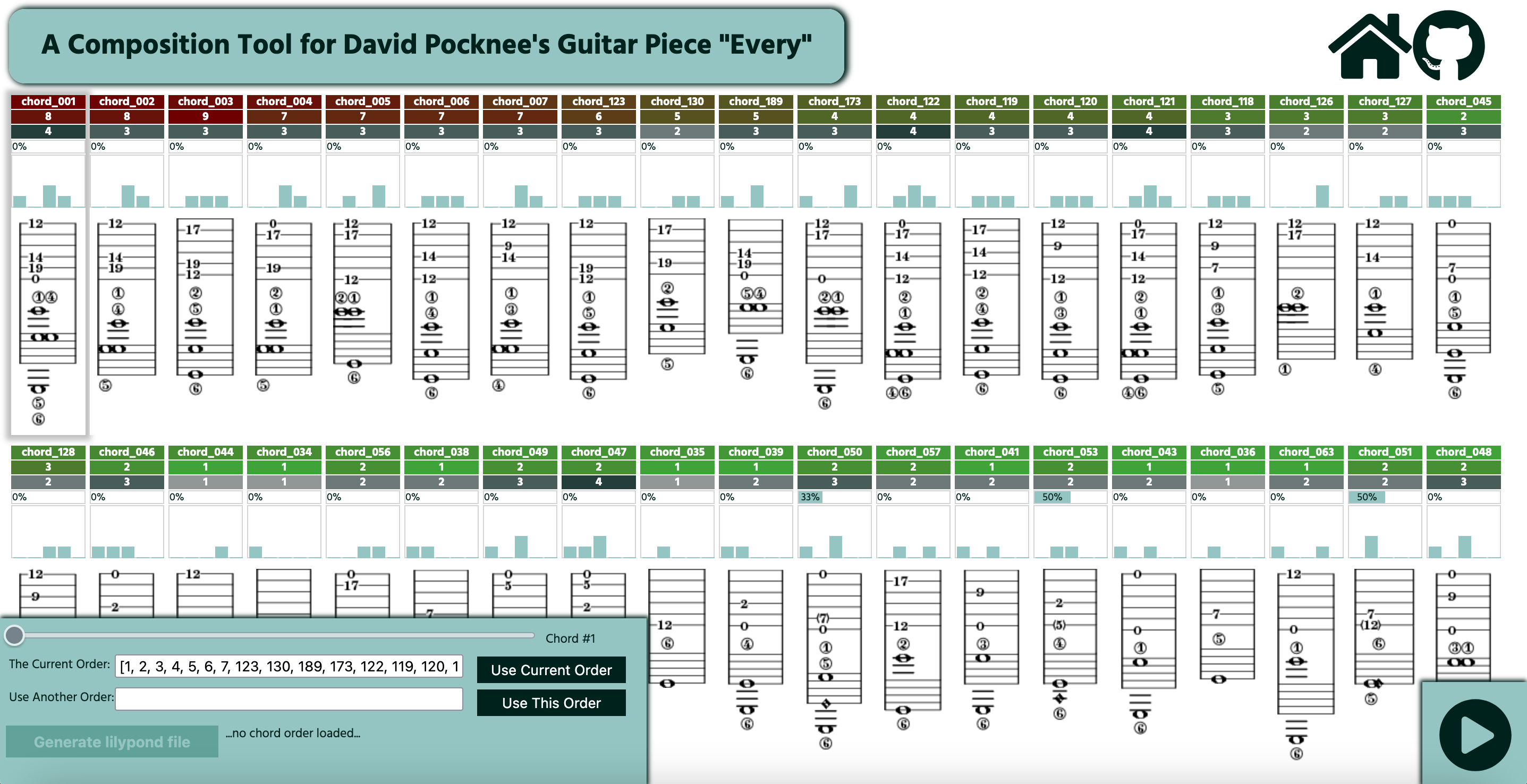
The screen shows a grid of guitar chords, each with a set of metrics above them. A user can drag-and-drop any of the chords to any place in the grid, changing the order that chords will occur in the place.

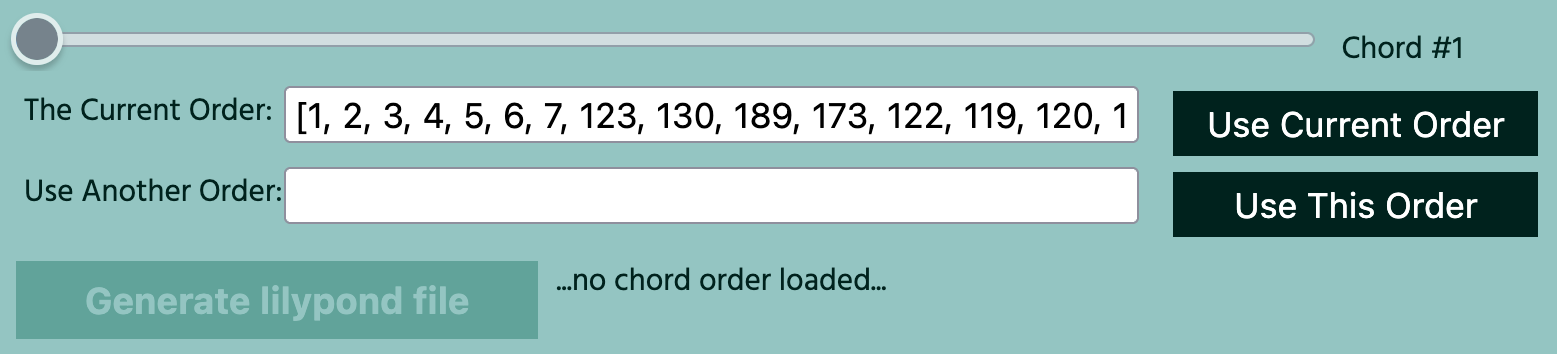
Pressing the playback button in the bottom right of the screen will start a synthesized playback of the current order of piece, using the predetermined rhythm of the work. The slider in the bottom left of the window can be used to choose the chord from which this playback starts (indicated by a shadow).

Below the slider, is a text box with the label "The Current Order". The contents of this box represents the current ordering of chords as an array of numbers. This array can be copied by the user and loaded back into the program by pasting it into the box below (labeled "Use Another Order") and clicking the "Use This Order" button.

If a user is happy with the order to be taken to a new window containing the code for a lilypond file of the notation of their version of the guitar piece.

The every composition tool website

The chords

Each chord is written in tablature and standard notation, and has a set of statistics above it, which should help aid finding an ideal place for it in the piece:

The chord interface
  • A chord reference number (e.g. chord_123).
  • How difficult the chord is to play.
  • The number of notes in the chord.
  • The percentage of notes in the chord that are harmonics.
  • A histogram showing how the sounding pitches in each chord are distributed over the five possible octaves.


The background color of the chord reference number and the chord difficulty, vary between green and red. The former is color-coded according to the duration before the next chord (long = green, short = red), based on the rhythm of the piece. The latter uses a scale from 1-9, in which 1 = easy/green and 9 = very difficult/red. The use of these two metrics should help ensure that difficult chords can be located in places in the piece in which there is adequate time to prepare and execute them. The number of notes in the chord is als color-coded - the more notes, the darker the color.

You can see the name of each statistic by hovering your mouse over it.